
Table of Contents
How to Choose a Gaming Mouse - Ergonomics Calculator
By Dr. Matthew Hwu, PT, DPT, OCS, CSCS·
Quick answer
To choose a gaming mouse that fits, measure your palm and the mouse in millimeters, then compare them with the 1HP Optimal Mouse Fit Calculator. You need your palm height and palm width, plus the mouse's length, width and height. The calculator turns these into hand-to-mouse ratios that show whether the fit falls in an acceptable range.
Fit is only part of the picture. Weight, DPI, sensitivity and binds matter too, and preventing wrist pain still depends on posture and ergonomics, wrist conditioning and managing your schedule.
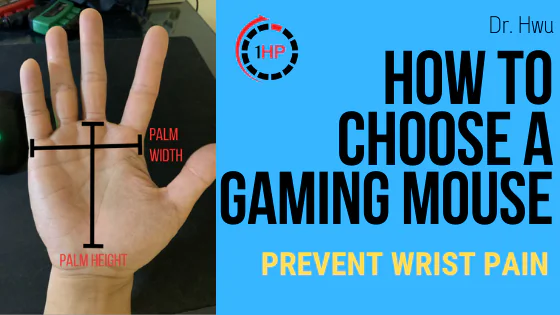
Hello Hello! This article will help you fit the size of your hand to the mouse you are interested in. This way you can test how well your hand will fit to your MOUSE OF CHOICE!
I want to present the 1HP Optimal Mouse Fit Calculator!
🖱️ 1HP Optimal Mouse Fit Calculator
Enter your measurements in millimetres to find your ideal mouse fit
Your Hand
Base of pinky/thumb muscles to top of middle knuckle
Horizontal distance from pinky knuckle to index knuckle
Your Mouse
Length of the mouse through the midline
Width at the widest point from a top-down view
Height at the peak of the mouse
Results
Enter your measurements to see your fit ratios
This article will guide you through how you can use the calculator and is in conjunction with the YT video below on how we designed this calculator. But first what measurements you will need. Grab a ruler since all of the measurements will be in millimeters. We will be measuring the following metrics
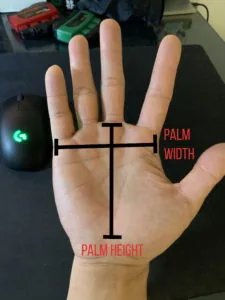
Palm Measurements:
1. Palm Height - From the base of the pinky & thumb muscles and extends to the top of the middle knuckle
2. Palm Width - Horizontal Distance from pinky knuckle to index knuckle
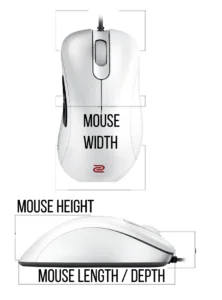
Mouse Measurements:
1. Mouse Length / Depth - Length of the mouse going through the midline
2. Mouse Width - How wide the mouse is from a top-down view, at the middle of the mouse
3. Mouse Height - How tall the mouse is at it's peak
Ratios:
Simple Hand to Mouse Ratio:
Acceptable 1.8-2.15
2 is Golden
Complex Ratios:
Acceptable 1.2-1.6
1.4 is Golden
That’s it guys, hope our community uses this to make better decisions about finding a mouse that fits for our hand. Remember to consider the weight, DPI, sensitivity and binds if you have any wrist pain but make sure the fit works for you! Also don’t forget the big 3 to prevent and manage wrist pain
- Posture / Ergonomics
- Wrist Conditioning
- Schedule Management

PS: If you are dealing with wrist pain from gaming - click here to learn exactly what exercises you can do to fix your specific issue!