
Table of Contents
Vertical Mice, Split Keyboards, Still Sore: The Gear Spending Trap
By Dr. Elliot Smithson, PT, DPT, MS, ATC, EMT·
Quick answer
If your wrist still hurts after an ergonomic keyboard and mouse, the gear probably did its job: it lowered strain per minute. It cannot build the tendon endurance your daily hours demand.
A vertical mouse, for example, shifts work onto the thumb muscles and the wrist deviators (the muscles that tilt your hand side to side). Before the next purchase, log how long you can work before symptoms start, take short regular breaks, and train endurance with a light dumbbell.
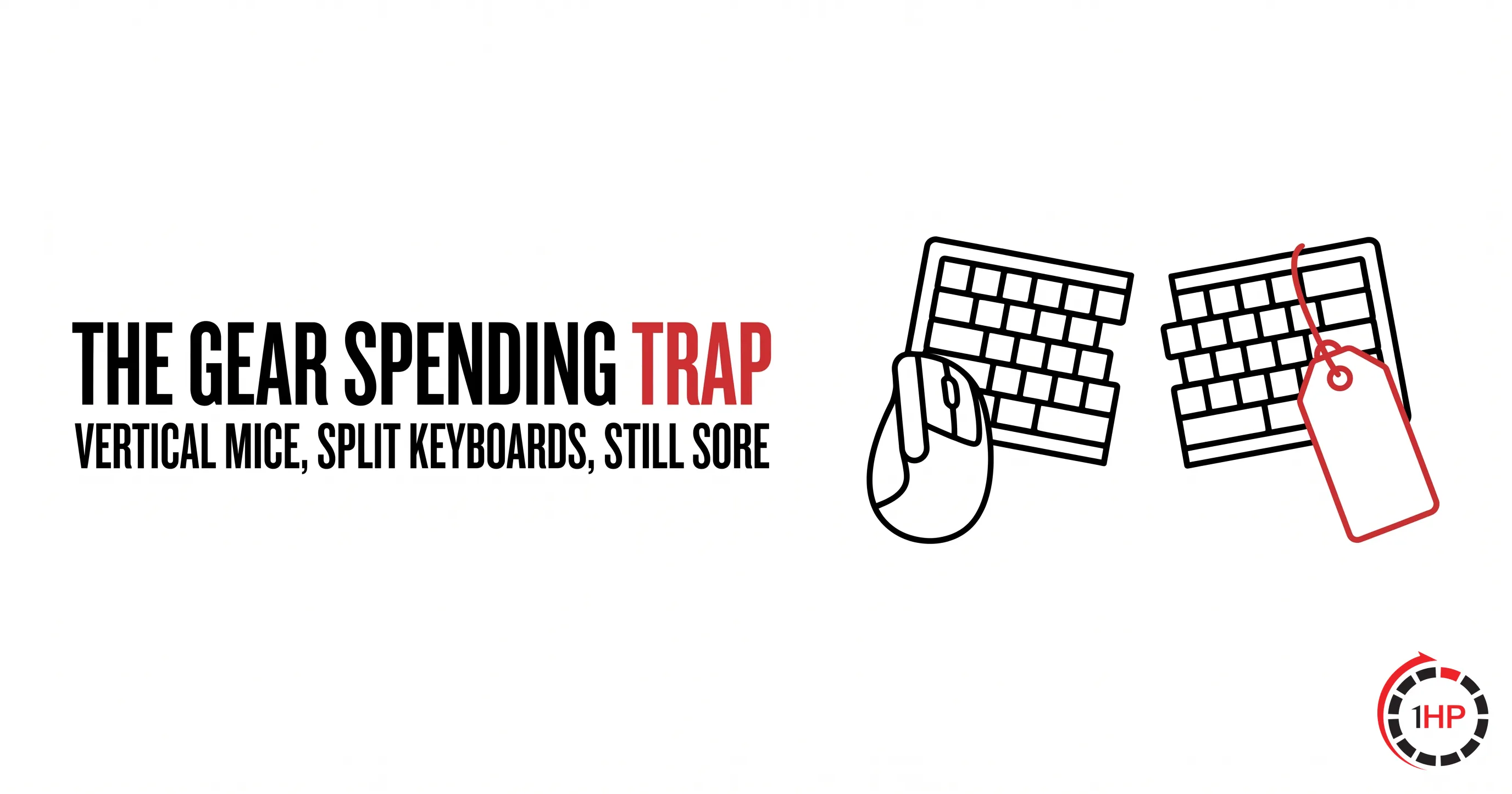
Almost every ergonomic product page tells the same story. Fix your posture, and the pain goes away. It is a tidy story, and it sells a lot of mice.
I have spent my career around people whose hands are their livelihood, from musicians during my Master's work at Marshall University to esports players since 2019. They don't get stuck because they bought the wrong gear. They get stuck because gear changes posture, and posture is only a small piece of repetitive strain injury (RSI), the catch-all name for overuse pain in the hands, wrists and forearms. One useful test before any purchase: ask yourself what you would try next if the pain stayed the same with the new device.
The approach in this article was built from esports medicine work with Team Liquid, 100 Thieves, CLG, Immortals and FlyQuest.
So this article does something gear reviews skip. It adds up the upgrade cycle one product category at a time, from the vertical mouse to the split keyboard, the keyboard tray, the chair, foot pedals and voice typing, without naming a single brand. For each one you'll see what it really changes, what it leaves alone, and what it quietly costs in money, setup time and relearning.
Then it turns to the part that settles pain: managing load and building endurance. You'll get a one-week test you can run with a notebook, a light dumbbell and a free metronome app, so your next decision rests on your own numbers instead of a product page. You'll also find answers to the questions people ask most.
First, the gear itself, and what a vertical mouse really does to the muscles in your hand.
You did the responsible thing. Your wrist started burning after long days, so you bought a vertical mouse. Then a split keyboard. Maybe a new chair after that. Each one felt better for a while. Then the ache crept back on the heavy days.
You are not alone, and you did not pick the wrong gear. Repetitive strain injury (RSI) is a catch-all term that covers tendonitis, carpal tunnel syndrome, cubital tunnel syndrome and similar problems. A long-running student RSI group at a major university lists the signs plainly: pain, soreness, numbness, tingling, burning, aching, stiffness or clumsiness in the hands, wrists or forearms. Its prevention advice centers on breaks and basic setup, not on specialized equipment.
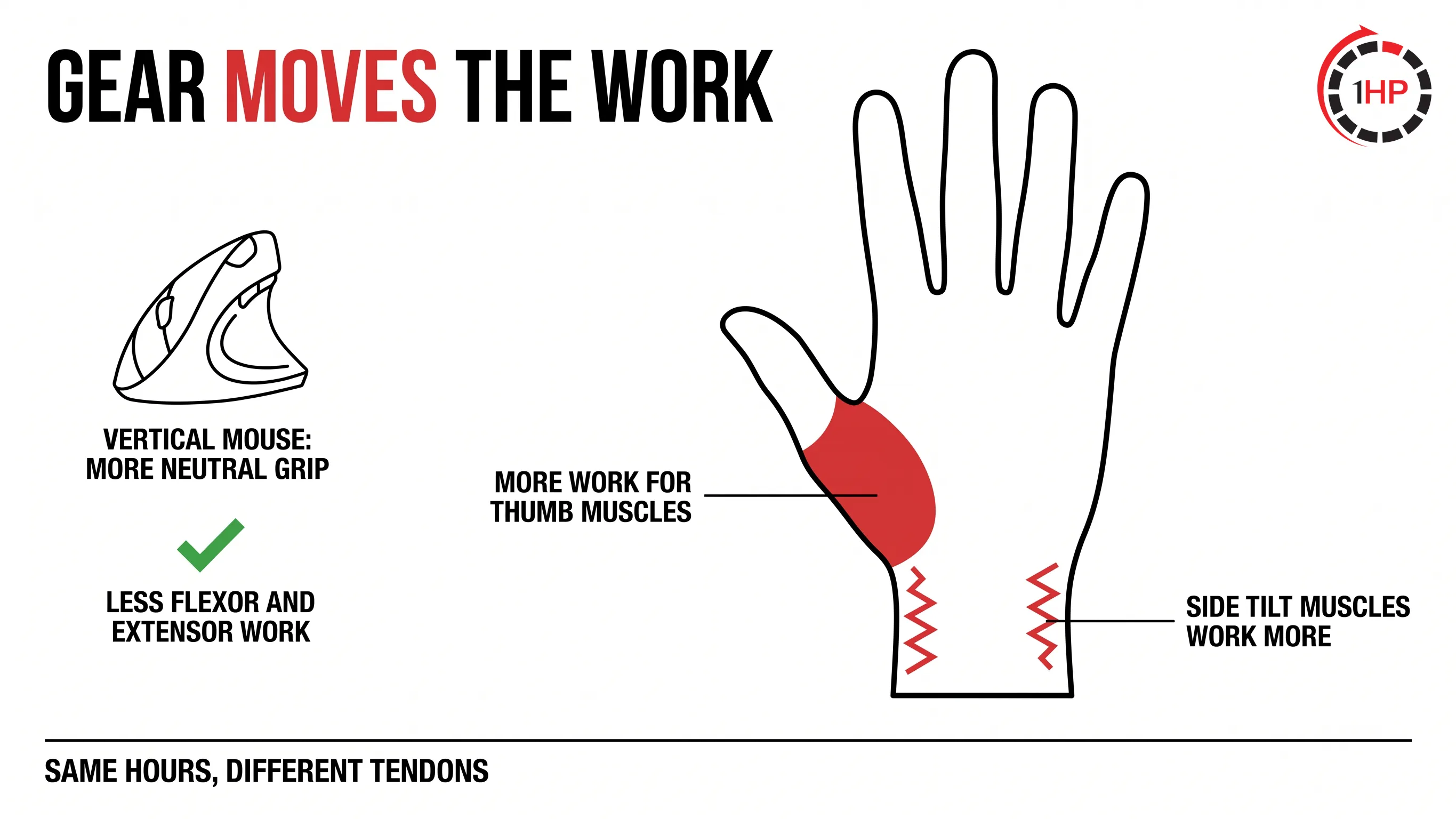
Start with the most common first buy. It does not shrink the work. In 1HP's full video on the vertical mouse, 1HP experts explain that a vertical mouse puts your hand in a more neutral grip, which eases some of the flexor and extensor work but shifts more effort onto the wrist deviators (the muscles that tilt your hand side to side) and the thumb muscles.
Before your next checkout, jot down how many hours your hands actually work each day, counting the job and the games.
So the question worth asking is not which product comes next. It is what each upgrade actually bought you, category by category.
Does a vertical mouse or ergonomic keyboard really help prevent carpal tunnel?
A vertical mouse or split keyboard can make each minute at the desk feel easier, but neither one builds the tendon and muscle endurance that keeps pain from coming back.
Before another device goes in the cart, it can help to answer four quick questions:
- Does the pain ease on light days and flare on heavy clicking or typing days?
- Did the last device help for a few weeks, then the soreness crept back?
- Do hand tasks away from the desk, like gaming, cooking or carrying bags, still bother you?
- Have you changed how much you work and how often you break, or only what you work on?
If you answered yes to two or more, the gear is probably doing its job. The job is just smaller than the box promised.
In 1HP's case data, posture and ergonomics account for roughly 10 to 20% of what drives most wrist and hand injuries in the people we see, with tissue capacity making up the other 80% or so. That is why I think of gear as something that slows the drain, not a fix for the root cause. Picture your health bar in a long ranked session: a better setup lowers the damage per hit, but it does not raise your max HP.
Load > Endurance = Pain. A new device trims the load side a little. The endurance side sits right where it was.
Picture the usual first step. A vertical mouse goes on the desk and brings some relief. Some, not all, so the next purchase follows.
A 31-year-old remote worker on the r/RSI forum shared a similar experience in 2025: the vertical mouse helps, yet the pain still shows up on days with a lot of clicking. That is one person's story, and it may sound familiar.
The common assumption is that a better wrist position prevents injury. Position does matter, and I would never ask you to type with your wrists cranked back. But a friendlier angle only changes how hard each muscle works per minute. It does not change how many minutes that muscle can handle before it gets cranky. A fair question to ask yourself: does your pain follow your heaviest days at the desk, whatever mouse you happen to be using? Among 1,023 people who applied for 1HP's coaching program (November 2025 to September 2026), carpal tunnel syndrome was the condition a doctor or test had named most often (19 people), and also the one most often ruled out or called a misdiagnosis (8), according to The 1HP Wrist and Hand Pain Report 2026.
If a doctor has already put a carpal tunnel label on your pain, our guide to carpal tunnel from repetitive strain explains why 1HP experts often find overworked tendons behind that label.
Patrick, an artist in the games industry, shows what shifts the picture. He came to 1HP after a 2-year problem that was still painful after surgery, with pain the moment he held the mouse and soreness in his pinky and ring finger within 30 minutes. After 12 weeks of building capacity with our team, he now works and draws 8 to 9 hours a day without pain. What changed was what his hands could handle, which raises the next question: if each device only trims the load, what does the whole shopping list add up to?
Why does wrist pain outlast each new device?
A writer bought a vertical mouse for wrist pain, then a split keyboard, then foot pedals. The keyboard cut typing speed from 110 words per minute to 20. The pedals brought ankle pain.
Harshal Patil, a consultant, wrote about the sequence in 2023. After 21 days of daily practice, Patil was back to 100 words per minute and gave a modest verdict: "My wrists are happier." Patil also admitted to learning the keyboard's benefits mostly from the maker's promotional material. One account proves nothing about anyone else. Still, it raises a fair question: if each device helped a little, why did the problem keep calling for another one?
Part of the answer lies in what ergonomic gear changes. Matthew Hwu, a physical therapist and 1HP co-founder, calls it stress per unit of time: how hard particular muscles have to work in a given position. A vertical mouse takes load off the wrist flexors and extensors, he wrote in a December 2025 forum post, but often "it redistributes towards the thumb muscles, thumb and pinky side of the wrist." He asked whether such gear helps a sore wrist and gave his own answer: "Yes, but only temporarily."
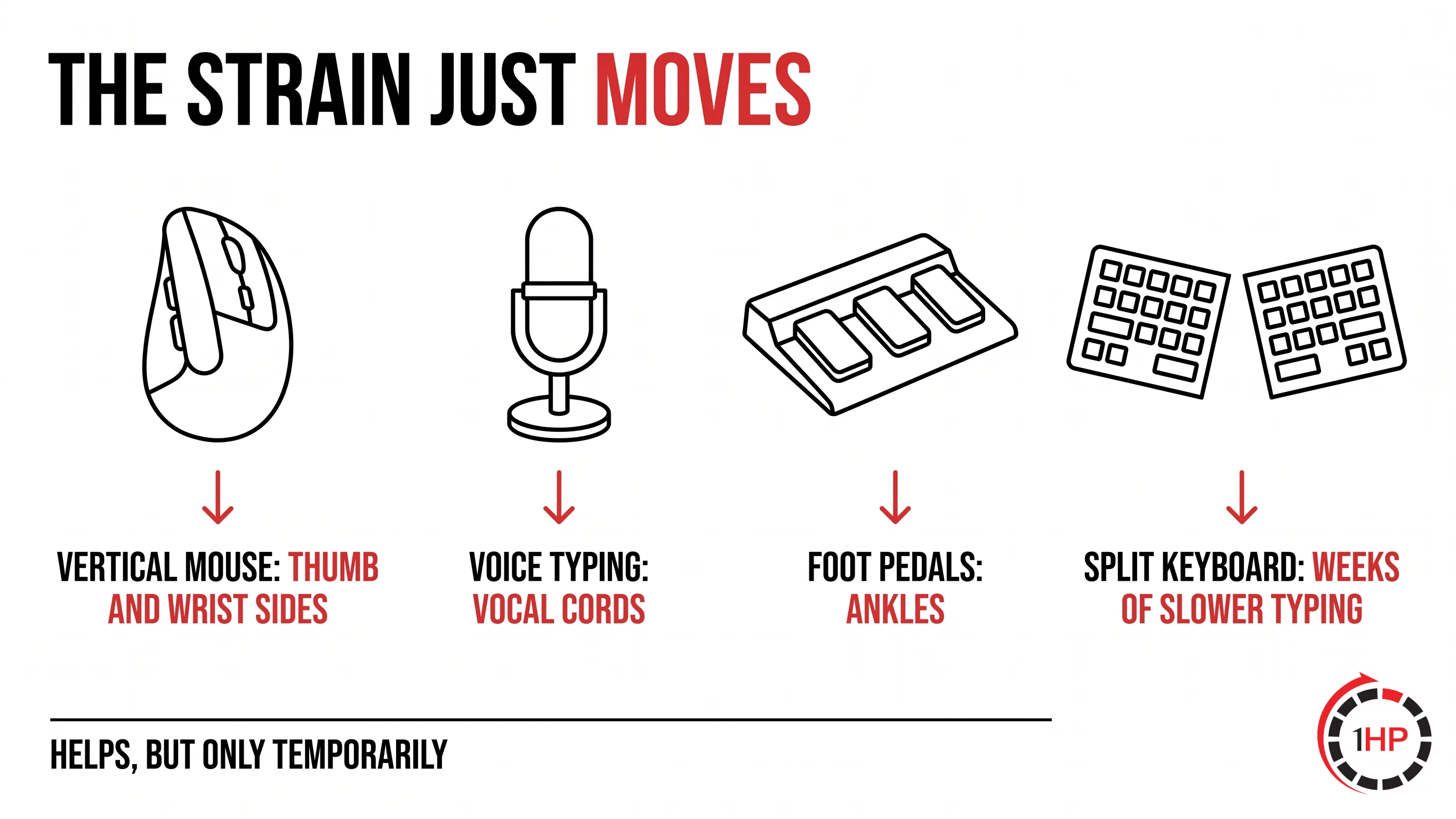
Look at other categories the same way and the pattern holds. The strain moves, and the cost of moving it turns up somewhere new.
| Device change | Where the work goes | What the switch cost |
|---|---|---|
| Vertical mouse | Thumb muscles, thumb and pinky sides of the wrist | Relief our experts describe as temporary |
| Low-travel keyboard | Less finger travel for the wrist flexors and extensors | Endurance unchanged, in our experts' view |
| Voice typing | Vocal cords | No rebuilt ability to type for long stretches |
| Foot pedals for Shift | Ankles | Ankle pain, in one writer's account |
| New split keyboard | Relearning how to type | Weeks of slower typing, in the same account |
Voice typing shows the trade most clearly. It takes the hands out of the work entirely, Hwu wrote, but "the stress goes somewhere," and dictation does nothing to rebuild the ability to type for hours.
Because each device brings some relief, the next purchase seems reasonable. In a 2025 thread on an RSI forum, a 31-year-old remote worker wrote that a vertical mouse helped, yet "I still feel pain whenever I'm clicking a lot," and was weighing a new keyboard, desk, chair, pedals and dictation. One reply came from the creator of a voice dictation app, who disclosed that stake. That person had tried a tented split keyboard, a roller mouse, a sit/stand desk, a low-back chair and foot pedals, found them only "somewhat helpful," and moved to voice for everything. Prices climb along the way. On a BBC podcast in May 2026, the three ergonomic keyboards discussed cost £115, about £275 and about £817.
The marketing we read tells a simpler story. One maker's keyboard page offers a quiz that matches buyers with a device, bundles keyboards with its own mice, and promises the pair will let you "say goodbye to strain while you power through your day." The evidence on prevention is thinner. On the same BBC podcast, a hand surgeon in a recorded clip said carpal tunnel syndrome affects around 5% of the population. According to the surgeon, office workers get it about as often as everyone else, and no proven mechanism links keyboard use to the changes the condition involves. The surgeon added that a better keyboard, a higher screen and straighter elbows can often settle tingling, so setup still counts. The show's ergonomics guest gave gear a conditional yes, after setup, breaks and movement.
Our own records suggest how often the other side of the problem, endurance, gets missed. In 72 of 77 onboarding notes, our experts recorded that the care a member had before joining had not trained endurance. The figure comes from the 1HP Research report Why did earlier care fall short?, which our research page lists as an early signal. It reflects our experts' reading of each case, nobody has checked it independently, and it may change as more members report.
Some people do find relief through gear. A developer on a keyboard forum wrote in March 2026 about years of hand-wiring keyboards, switching layouts, moving to split boards and experimenting with tenting. Today, the post says, "the wrist pain that started all this is gone." The same developer spent "way more time on this than I originally expected" and did not say which change mattered, or whether time played a part. Another forum user said a split keyboard tented to about 90 degrees made workdays pain-free, while life outside work still hurt.
Line the devices up side by side and every one of them answers the same question: where should the work land? None of them answers how much work the hand can take. The relief at the desk is real, which is why each purchase feels sensible. Yet that second user's life away from the keyboard shows what stays the same when only the setting changes. The accounts fit our experts' view but cannot prove it, and no source we found tested another device against endurance training directly.
Before your next purchase, run these checks:
- Ask where the new device will send the work, and whether that spot already aches.
- Count the switching cost against your calendar: relearning a keyboard can mean weeks of slower typing.
- When a product page or matching quiz promises less strain, ask what shows that the device prevents injury, beyond feeling comfortable.
- If you have already seen a provider for the pain, ask whether the plan built forearm endurance or only covered rest, braces and setup.
- Notice whether the pain follows you away from the desk. If it does, the gear may have changed your setting more than your tolerance.
How we checked this
Our sources were a forum post by a 1HP co-founder explaining our approach, one 1HP Research report, a keyboard maker's product page, a BBC podcast episode, and three first-person accounts (a personal blog and two forum threads). The 72 of 77 figure is ours. It comes from an internal analysis that has not been peer reviewed, and it is an early signal based on our experts' reading of call notes. The podcast transcript was machine generated, so we paraphrased it, and our notes did not name the surgeon in the clip. Each forum and blog account describes one person's experience, and one forum reply came from the maker of a voice app. We sell online coaching programs built around endurance, so we have a stake in arguing that gear is not enough. Two questions remain open: how gear compares with endurance training in a direct test, and whether shifted strain causes new problems over time.
- Matthew Hwu, forum post on ergonomics and endurance, December 17, 2025.
- 1HP Research, Why did earlier care fall short?, November 2026, internal analysis.
- BBC, Sliced Bread podcast episode on ergonomic keyboards, May 14, 2026.
- An ergonomic keyboard maker's keyboard collection product page, July 2026.
- Harshal Patil, personal account of ergonomic upgrades, October 24, 2023.
- RSI forum, thread on which equipment changes helped, September 15, 2025.
- Ergonomic keyboard forum, thread on a path from wrist pain to split keyboards, March 15, 2026.
What does a capacity-first approach do that another device can't?
A capacity-first approach treats wrist pain as a tissue endurance problem, not a structural one, so it raises what your tendons can handle while gear keeps the load manageable.
That framing also explains why a clean MRI and a cortisone shot so often leave people right where they started. Nothing structural is broken. The tissue is simply underprepared for the job you are asking it to do.
My co-founder, Dr. Matthew Hwu, a physical therapist who has specialized in RSI for about 10 years, puts it plainly. In 1HP's experience over the past decade, ergonomic changes on their own bring temporary relief at best, while underlying endurance and daily habits matter more. He summed up the gear side in one line: "Ergonomics affects the STRESS per unit TIME."
Here is how that plays out with the devices people buy most:
- Vertical mouse: lowers the per-minute stress on the wrist flexors and extensors (the palm-side and back-of-hand forearm muscles), but often shifts that load toward the thumb muscles and the thumb and pinky sides of the wrist.
- Low-travel keyboard: shortens how far your fingers move per key, which again lowers stress per minute on the same forearm muscles.
- Voice-to-text: removes hand stress entirely, but the work moves to your vocal cords, and it does nothing to bring back long typing sessions.
Notice the pattern? Ask one question of any device: which muscle picks up the work it saves? A simple first step: time how long a normal session runs before your forearm starts to ache, and treat that number as your baseline. If your thumb started aching after a mouse swap, our guide to palm side thumb pain from repetitive strain covers why that redistribution can catch up with you.
Dr. Hwu uses a marathon to make the point. Nobody in their 30s who hasn't trained for years signs up to run one tomorrow and expects their legs to be fine. Yet many of us do the desk version, 8 or 10 hour days of tiny repeated movements, on forearms that have had no endurance training at all. He calls esports players "the olympians of desk work," and the pros I have worked with train like it.
GEAR BUYS YOU TIME. ENDURANCE IS WHAT YOU SPEND IT ON.
That does not make your new mouse a waste. Dr. Hwu's advice is to use these tools "in a meaningful way": for example, keeping a vertical mouse for a while to calm flexor and extensor irritation while you build endurance, manage your schedule better and learn how pain actually works. It is a support role, not the main quest.
This is the reason 1HP specializes only in repetitive strain injuries of the wrist, hand and forearm, and why each member gets a personalized plan with direct 1:1 access to an RSI specialist, not a generic exercise sheet. Two people with the same split keyboard can need very different starting loads. So the device can stay on the desk. The real question is what goes on your calendar next to it.
What should you do before buying another ergonomic device?
Before buying anything else, spend one week measuring how long you can work before symptoms start, fix the free setup basics, then retest to see whether your tolerance is climbing.
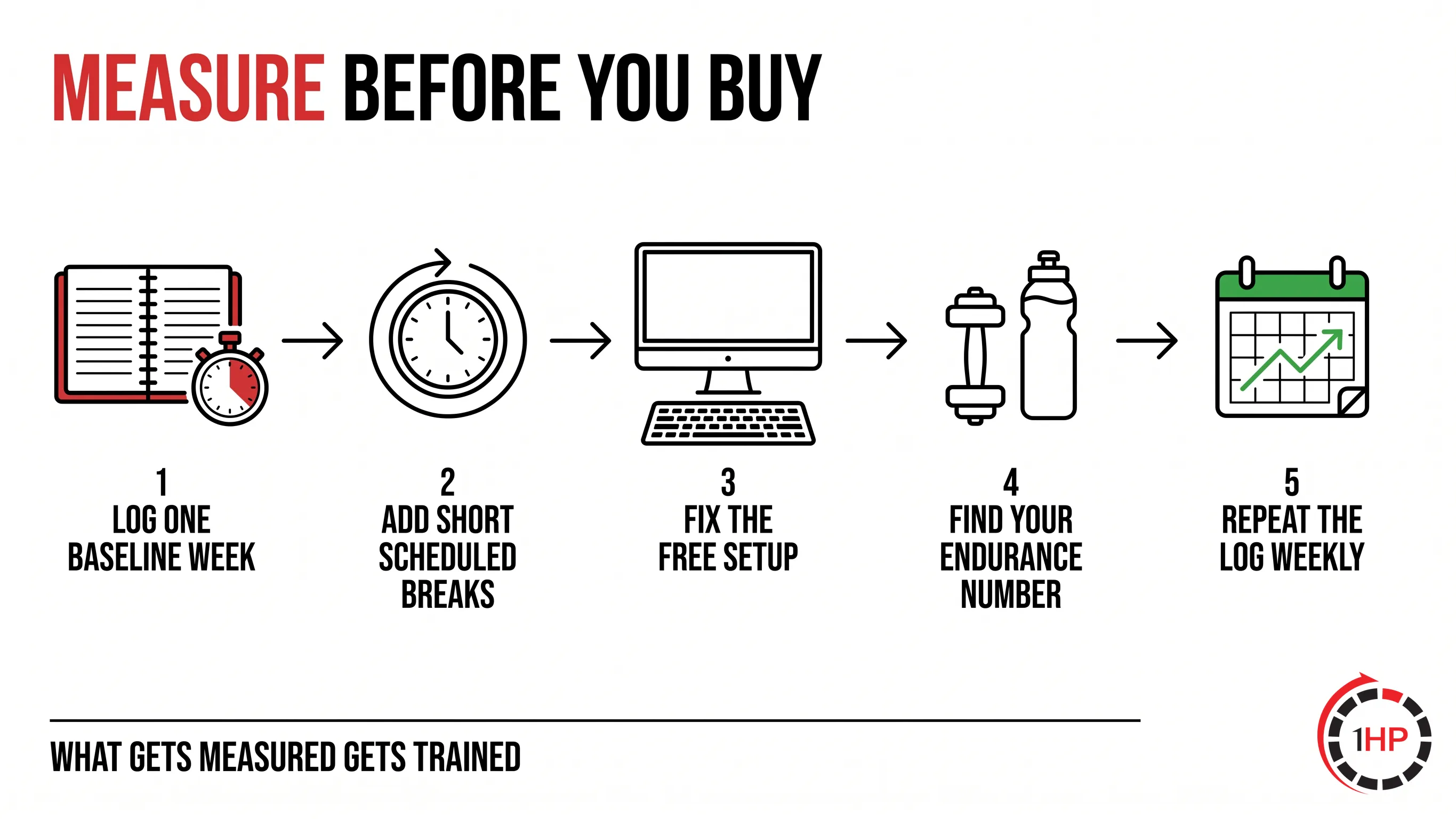
It is normal to want a quick win when your hands hurt. A purchase feels like action. These five steps are action too, and most of them cost nothing:
- Log one baseline week. Each day, start a phone timer when you begin a continuous stretch of mousing or typing and stop it the moment symptoms show up. Write down those minutes. At bedtime, rate the day's pain from 0 (none) to 10 (worst imaginable). Seven days, two numbers per day.
- Add short, scheduled breaks. Harvard RSI Action recommends 1 or 2 minutes of rest for every 10 or 15 minutes of typing. Set a repeating timer so the break does not depend on your willpower in the middle of a sprint.
- Fix the free geometry. The same Harvard group suggests a keyboard low enough that your elbows sit at about 90 degrees or a little more open, with the monitor at about eye level. Use the wrist rest between bursts, not during them, and press shortcut combos with the opposite hand instead of twisting one hand into a claw.
- Find your endurance starting point. Grab a light dumbbell (a full water bottle works), set a free metronome app to a steady beat, and count how many slow, controlled wrist curls you can do in a row before your form slips or symptoms change. That count is your number.
- Repeat the log every week. If the minutes before symptoms climb and the bedtime rating drops, your capacity is going up. If neither moves, that tells you something useful too.
A brief aside from me: I would rather you spend a week with a notebook than an evening comparing keyboard switch weights. The notebook teaches you about your hands. The comparison chart only teaches you about the product.
Notice what the log does. It turns "my wrist still hurts" into a number you can watch move. Without it, every new device gets judged on a hunch, and a hunch on a good day looks a lot like a cure.
Our approach was shaped by work with more than 3,000 people over 10 years across our practice, esports work and programs, and the lesson I keep coming back to is simple: what gets measured gets trained. If you want the research behind that idea, our page on the evidence-based wrist pain recovery approach lays it out in plain language.
Once you have two or three weeks of numbers, a new device stops being a guess. You can try it for a week, keep everything else the same, and see whether your minutes before symptoms actually change, or whether the gain came from the breaks you started on day one.
Where should your next dollar go if your wrist still hurts?
Put it toward building endurance before another device. A light dumbbell and a free metronome app are enough to start measuring what your forearm can handle this week.
The upgrade cycle will keep tempting you. Every new category promises to fix what the last one missed. But setup is the smaller slice of what drives most wrist and hand pain, and tissue capacity is the bigger one. Each extra dollar spent on the small slice buys a little less relief than the one before.
1HP's livestream Q&A on a framework for recovery and the vertical mouse starts from a feeling I hear about constantly: you rest, you wear a brace, you take medication because that is what most resources suggest, and you end up confused about what to do next. A new keyboard is the same move with nicer packaging.
A student RSI group at one university found that people rarely pay attention to RSI until symptoms show up. You already have the symptoms. Treat them as your reminder.
Start with this week's log, and let your own numbers decide whether the next thing you buy is a device or a light dumbbell.
Summarize This Article With AI
Open this article in your preferred AI engine for an instant summary.
Frequently Asked Questions
What else do people ask about ergonomic gear and wrist pain?
Most questions come down to three things: whether gear prevents injury, what switching devices costs you, and where to turn once the devices stop helping.
Can an ergonomic keyboard prevent carpal tunnel syndrome?
The mainstream answer is shakier than the marketing suggests. A hand surgeon on the BBC podcast Sliced Bread said carpal tunnel syndrome affects around 5% of the population, that office workers don't get it dramatically more often than anyone else, and that there is no proven mechanism by which keyboard use causes it. In 1HP's view, many cases labeled carpal tunnel are irritated tendons pressing on the median nerve. A keyboard can't build tendon capacity.
How long does it take to get used to a split keyboard?
Expect a real slowdown. Your typing speed will likely drop while your hands relearn where every key sits, and it takes weeks of daily practice to climb back. That is a lot of retraining before you learn whether the pain moved.
Can a new ergonomic device cause a different pain?
Yes. A device that hands a task to a new body part hands the work over too. Foot pedals for the Shift key, for example, take the stretch off your fingers and give that work to your ankles. The load moved. It did not disappear.
What is load management?
Load management means adjusting how much and how long you use your hands so the work stays inside what your tissues can handle, then raising that limit with graded exercise. Gear lowers strain per minute. Load management changes the total.
How do I get help from 1HP?
People start with a free consultation with a 1HP expert, a licensed physical or occupational therapist who looks at your hours, your symptoms and your goals. Everything happens online, and no referral is needed, so you can book straight from the 1HP website.
Written by
Dr. Elliot Smithson
PT, DPT, MS, ATC, EMT, Co-Founder
Dr. Elliot Smithson earned his undergraduate degree from the University of Central Florida in Athletic Training, his Master's from Marshall University in Athletic Training, and his doctorate in Physical Therapy from the University of St. Augustine for Health Sciences.
Follow on XThis article is for educational purposes only and is not a substitute for professional medical advice, diagnosis, or treatment.